Approvals
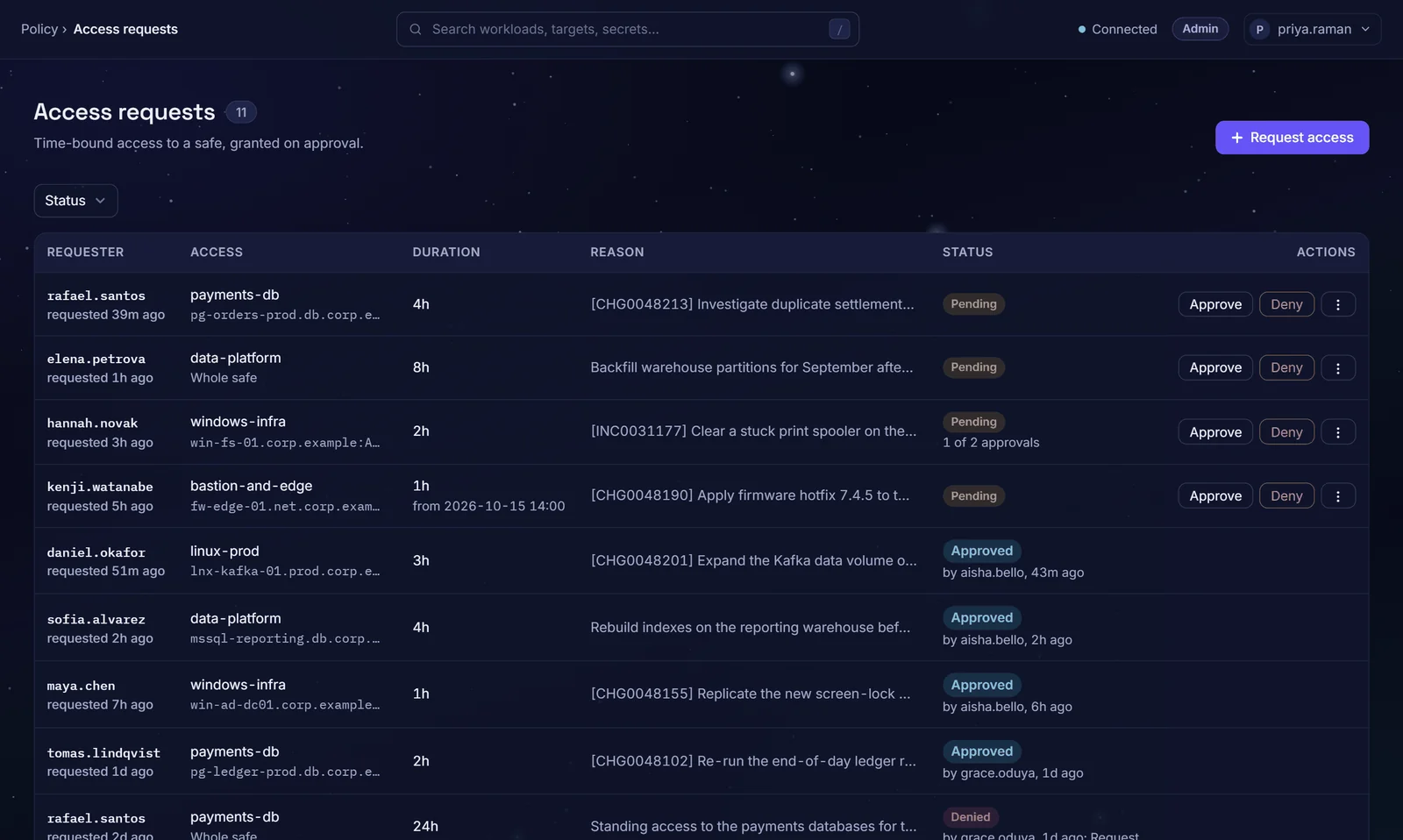
People ask for time-bound access to a safe; its approvers decide with the request's details in front of them. Approval creates a grant that expires on its own.
An approval should be a record, not a message
Approved in a chat thread
A yes in chat grants the access; later, nobody can show who approved what.
Decisions without context
The approver sees a name and a system, not the reason, the ticket or how long.
Access outlives the approval
The approval covered one job; the access is still there months later.
22%of breaches began with credential abuse, the leading initial attack vector. Source: Verizon 2025 Data Breach Investigations Report.
The right approvers, with the full picture
Approvers set per safe
Each safe names who may approve its requests, by person or by group; Admins can also decide. Approvers need no admin rights.
More than one approval
A safe can require a set number of approvals, each from a different approver.
Approval chains
Stages run in order, such as team lead then security. A later stage cannot vote until the one before it has passed.
Context on every decision
The approver sees who asked, for which safe or account, for how long and from when, with the reason and ticket when given.
Tickets checked in your ITSM
When you connect ServiceNow or Jira, a safe that requires a ticket has it checked when the request is filed and again at approval.
Step-up MFA on decisions
An approver with TOTP enrolled in Zerostand confirms approvals and denials with a code.
From request to grant
Request
Pick a safe or one account in it and the duration; add a start time, reason or ticket as needed.
Notify
The safe's approvers are emailed once you configure email. In a chain, only the current stage hears.
Decide
Approvers approve or deny. A denial needs a reason, which the requester sees.
Grant
The final approval creates the grant. It expires on its own, and a session still open at expiry is cut within 30 seconds.
The tools your approvers already use
- ServiceNow
- Jira
- Email over SMTP
- TOTP authenticator apps
One configurable ticket checker covers ServiceNow and Jira. Notifications go by email; Slack and Teams are not in this release.
Questions buyers ask
Can a request need two approvers?
Yes. In a chain, each stage has its own approvers and count. Nobody approves their own request or votes twice at one stage, and every vote is audited.
What if our ITSM is down?
You choose per safe. In advisory mode, the default, the request goes ahead and the unverified ticket is audited. In enforce mode it is refused while the ITSM cannot be reached. A ticket that does not exist or is in the wrong state is refused in both modes. Without a connected ITSM, a safe can still require a ticket that matches a pattern you set.
Do approvers need MFA?
Approvers who have enrolled TOTP in Zerostand must enter a code to approve or deny; one code covers ten minutes of decisions. A deployment setting requires it of everyone: deciders without TOTP, including single sign-on users, are then refused until they use a local account with MFA enrolled. The audit log marks each decision confirmed by MFA.
What happens to a request nobody answers?
With an approval timeout set (it is off by default), approvers are reminded at half the timeout, the request is escalated to your Admins at the full timeout and expired undecided at twice it. A safe can override the deployment's timeout. A scheduled request whose window has passed expires whatever the timeout.
Can access be scheduled for a change window?
Yes. A request can name a start time; the grant opens then and closes after the approved duration, ending within 30 days. Before the start it authorizes nothing.
See it on your own systems
Four weeks on your own servers and a database.